How do the dean approves a newly created job in portal
Introduction
Amrita Job portal is a new career guidance portal which helps job seekers to find their career at Amrita. The Job seekers can avail job by registering themselves in to this portal, search and apply for different jobs which matches their profile. Here in this document we will look how the dean approves a newly created job in the portal for the job seekers to apply.
Getting Started
Open an internet browser (Recommended to use Google Chrome)
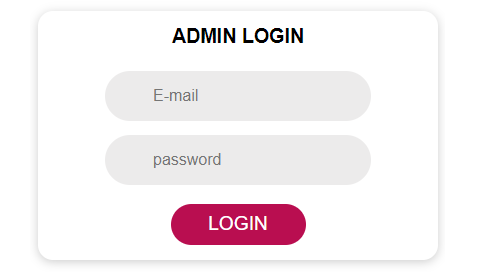
Type https://careers.amrita.edu/admin-login and click enter
Login with your amrita email id and password.
Click Login.
Approve Job Request
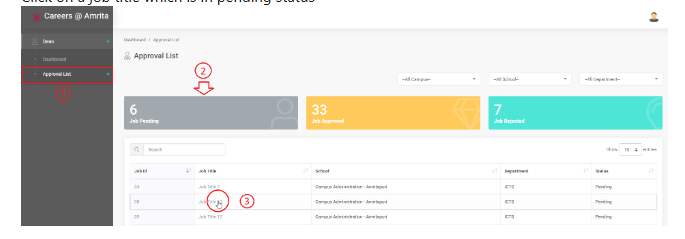
Go to Approval List in the left menu
Click on Job Pending to filter the jobs with pending status alone
Click on a job title which is in pending status
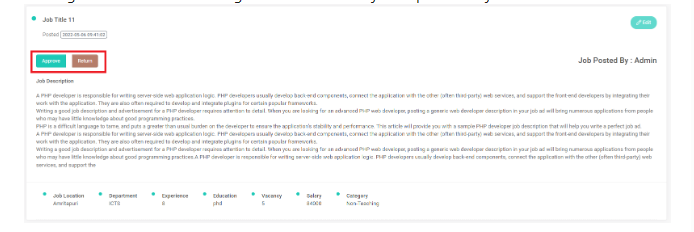
The job detailed page will open. Here the dean can go through the details.
Dean can edit the job details if required by clicking the Edit button at the right side of the page.
Dean can Approve or Return the job request.
Clicking the Approve button changes the status of the job request as approved and will display the job in the Job Search page at candidate side.
Clicking the Return button changes the status of the job request as Rejected.
From the Approval List page dean can apply filter and view the list based on
Job Pending
Job Approved
Job Rejected